
OPS Computing Modules — Windows Inside Your Interactive Display
A slot-in PC that turns a Tralltech interactive flat panel into a full Windows computer. Intel Core i5 or i7, plug into the OPS slot — no separate PC, no extra cables.
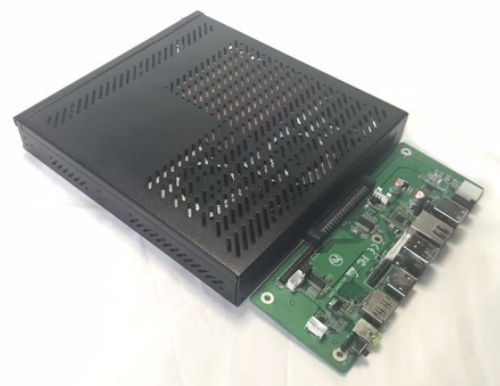
Choose the processor for the project
The T-CPU is available with Intel Core i5 or i7 processors across four generations — letting an integrator match performance to the room and the budget. Every configuration ships with 8GB RAM, 256GB storage and built-in WiFi.
| Generation | Processor options | RAM | Storage | Wireless |
|---|---|---|---|---|
| Intel 4th Gen | Core i5 / Core i7 | 8 GB | 256 GB | WiFi |
| Intel 6th Gen | Core i5 / Core i7 | 8 GB | 256 GB | WiFi |
| Intel 8th Gen | Core i5 / Core i7 | 8 GB | 256 GB | WiFi |
| Intel 10th Gen | Core i5 / Core i7 | 8 GB | 256 GB | WiFi |
Add Windows without adding a PC
The T-CPU is an OPS (Open Pluggable Specification) computing module — a complete Windows PC that slides into the OPS slot on the back of a Tralltech interactive flat panel. Once installed, the display runs Windows alongside its built-in Android, and users switch between the two from the panel.
Because it connects through the OPS slot, there is no separate computer, no HDMI or USB cabling and no extra power supply — the module is powered by the panel and shares its screen, touch, speakers and network.
- Plug-in OPS slotSlides into any T-IFP OPS bay — no cables
- Windows + AndroidSwitch between both systems from the panel
- Intel Core i5 / i74th, 6th, 8th and 10th generation options
- 8GB RAM + 256GB storageStandard across all configurations
- Built-in WiFiWireless networking out of the box
- Powered by the panelNo separate power supply or brick
- Standard OPS interface80-pin OPS connector, vendor-neutral
- Shares the panelUses the screen, touch, speakers and LAN
Full technical specifications
| Processor | Intel Core i5 or i7 |
| Processor generations | 4th, 6th, 8th and 10th Gen |
| RAM | 8 GB |
| Storage | 256 GB |
| Graphics | Intel integrated graphics |
| Operating system | Windows 10 / Windows 11 |
| Interface | Standard OPS slot (80-pin connector) |
| Power | Supplied through the OPS slot (no external power) |
| Wireless | Built-in WiFi |
| Shared with panel | Display, touch, speakers, network |
| Ports | USB / video / LAN — datasheet available on request |
| Compatibility | Tralltech T-IFP interactive flat panels with an OPS slot |
| Certifications | CE · FCC · RoHS |
| Warranty | 2 years from shipment date |
| Dimensions & weight | Datasheet available on request |
Part of a complete classroom & conference system
The T-CPU installs into a Tralltech interactive flat panel and works alongside the rest of the range:
Designed into our solutions
Windows teaching software
Adds Windows to the classroom display so teachers can run Office, exam tools and Windows-only educational software on the same panel.
Explore the Smart Classroom solution →Room PC for meetings
Turns the meeting-room display into a Windows room PC for desktop conferencing clients and shared applications.
Explore the Video Conference solution →Frequently asked questions
What is an OPS computing module?
An OPS (Open Pluggable Specification) computing module is a slot-in PC that slides into the OPS bay of an interactive flat panel. The Tralltech T-CPU module turns the display into a full Windows computer that shares the panel's screen, touch, speakers and network — with no separate PC or cables.
Do I need an OPS module if the interactive display already runs Android?
Only if you need Windows. Tralltech interactive flat panels run Android out of the box, which is enough for whiteboarding and casting. Add a T-CPU OPS module when the room needs Windows software — for example Office, specialist teaching applications, or a video-conferencing client that only runs on Windows.
Which processors and Windows versions are available?
The T-CPU is available with Intel Core i5 or i7 processors across the 4th, 6th, 8th and 10th generations, each with 8GB of RAM and 256GB of storage. The modules run Windows 10 or Windows 11, so an integrator can match the configuration to the project budget and performance need.
How does the OPS module connect to the display?
The T-CPU slides into the standard OPS slot on the back of the interactive flat panel and connects through the slot's pin connector — no HDMI, USB or power cables are needed. It is powered directly by the panel, and shares the panel's display, touch, speakers and network.
What is the difference between the i5 and i7 OPS module?
Both run Windows and share the same 8GB RAM and 256GB storage. The Core i7 module has a faster processor for heavier multitasking, large files or more demanding software, while the Core i5 module is the cost-effective choice for everyday teaching and meeting use.
Can the panel run Windows and Android, and switch between them?
Yes. With a T-CPU module installed, the interactive flat panel keeps its built-in Android system and adds Windows on the OPS module. Users switch between the two systems from the panel, so the same display serves both Android apps and Windows software.
Add an OPS module to your next project
Request a sample, get integrator pricing, or ask our engineers which Intel generation suits the room. We respond within 24 hours.
Guangzhou Tralltech Technology Co., Ltd. is a smart classroom and video conferencing system manufacturer.