
Wireless Screen Sharing Device — App-Free Casting From Any Laptop or Phone
A plug-and-press wireless presentation device for meeting rooms and classrooms. One 3-in-1 button casts from Windows, Mac, iOS and Android — to a Tralltech display or any HDMI screen, with no app to install.
Built-in sharing vs. the T-VID-WLS
Tralltech interactive flat panels already include built-in wireless sharing — so the T-VID-WLS is an add-on for specific cases, not a required part of every room. Here is when an integrator should specify it.
| Requirement | T-IFP built-in sharing | Add T-VID-WLS |
|---|---|---|
| Cast a laptop or phone to a Tralltech IFP | Covered | Optional |
| Cast to a non-Tralltech display, projector or LED wall | No | Yes |
| One-press physical button instead of an app | App-based | Yes |
| Two sources on screen at once (split view) | No | Yes |
| Touch-back control of the laptop from the screen | Limited | Yes |
One button. Any device. Any screen.
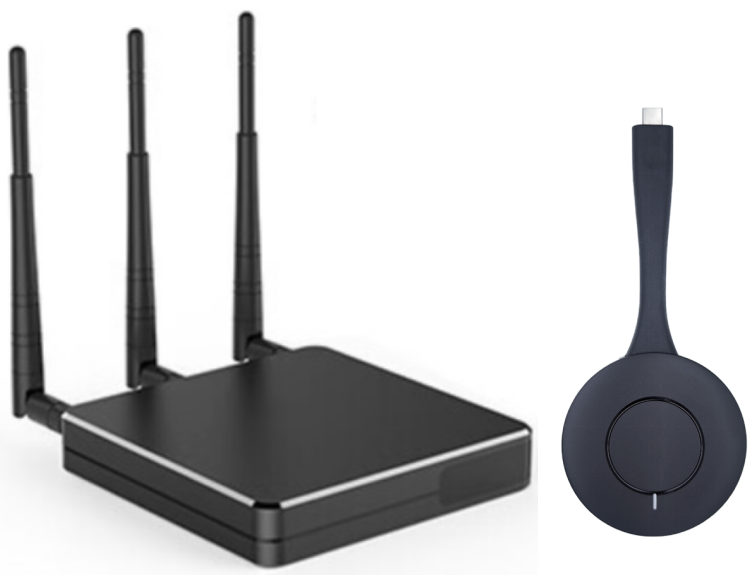
The T-VID-WLS is a business-grade wireless screen sharing device built around a 3-in-1 transmitter button — HDMI, Type-C and USB in one unit. A presenter plugs it into their laptop, presses once, and the screen appears, with no app or driver for most devices.
Because the receiver outputs HDMI, it casts to a Tralltech interactive flat panel or to any other HDMI display or projector — making it the add-on integrators reach for when a room has mixed devices or non-Tralltech screens.
- 3-in-1 transmitter buttonHDMI, Type-C and USB in one unit
- App-free & driver-freePlug in, press once, cast — for most devices
- Multi-OS & mirroringWin/Mac/Linux/iOS/Android + Miracast, AirPlay, Chromecast
- Two-screen split viewShow two sources side by side
- Touch-back controlControl the laptop from the display, 10-point touch
- Dual WiFiCast while staying connected to the internet
- Up to 4K3840×2160 with optional 4K button; 1080P60 standard
- Cast to any HDMI screenTralltech IFP, third-party display or projector
Full technical specifications
| Wireless interfaces | HDMI, Type-C, USB (3-in-1 transmitter) |
| Operating systems | Windows 7 / 10 / 11, macOS, Linux, Android, iOS |
| App / driver | App-free and driver-free for most devices |
| Mirroring protocols | Miracast, AirPlay, WiDi, Chromecast — mixed casting supported |
| Receiver software | No built-in program required for Miracast / WiDi casting |
| Standard transmitter | 3-in-1 HDMI / Type-C / USB button (single unit, default Type-C; separable into HDMI transmitter + Type-C-to-HDMI adapter) |
| Type-C plug-and-play | Android phone / iPad Pro / Windows / Mac with video-output Type-C — no driver, up to 4K |
| USB mode | For Type-C PCs without video output (first use installs driver) and HDMI + USB combo |
| Touch-back | Reverse touch / mouse control on supported devices, 10-point |
| Optional 4K button | Available for 4K wireless casting |
| Standard resolutions | 1080P @ 60fps; 2560×1600 @ 60fps |
| 4K resolution | 3840×2160 @ 30fps (with optional 4K transmitter button) |
| Split screen | 2 sources simultaneously |
| Extended display | Supported (Windows 7/10/11, Mac, USB transmitter) |
| Window casting | Cast a single application window (Windows client) |
| WiFi | Dual WiFi modules (cast while online) |
| Receiver output | HDMI |
| Housing | Aluminium alloy |
| Certifications | CE · FCC · RoHS |
| Warranty | 2 years from shipment date |
| Dimensions & weight | Datasheet available on request |
Part of a complete conference & classroom system
The T-VID-WLS is built to integrate with the rest of the Tralltech range. Common pairings:
Designed into our solutions
BYOD teaching & group work
Lets a teacher or student cast from any laptop, phone or tablet — useful for mixed-device classrooms and collaborative lessons.
Explore the Smart Classroom solution →Guest presenting in meeting rooms
A one-press button lets any visitor share to the room display without joining a network or installing software.
Explore the Video Conference solution →Frequently asked questions
What is a wireless screen sharing device and how does it work?
A wireless screen sharing device lets a laptop or phone show its screen on a meeting-room display without cables. With the Tralltech T-VID-WLS you plug the transmitter button into your laptop, press it once, and your screen appears on the display — no app or driver needed for most devices.
Do I need a wireless screen share device if my interactive display already has built-in casting?
Not always. Tralltech interactive flat panels already include built-in wireless sharing, so for casting to the IFP itself you may not need anything extra. The T-VID-WLS is for cases where you want a one-press hardware button, a two-source split screen, touch-back control, or casting to a non-Tralltech display or projector.
Does wireless screen sharing require an app or software?
No. The T-VID-WLS works app-free and driver-free for most devices — the transmitter button casts from Windows, Mac and Type-C laptops by plugging in and pressing once. It also supports Miracast, AirPlay, WiDi and Chromecast directly, so phones and tablets can cast without installing anything.
Which devices and operating systems can cast to it?
The T-VID-WLS supports Windows 7/10/11, macOS, Linux, Android and iOS. The standard transmitter is a 3-in-1 button with HDMI, Type-C and USB connections, so it works with almost any laptop, phone or tablet.
Can it cast to a non-Tralltech display or projector?
Yes. The T-VID-WLS receiver outputs HDMI, so it can drive any HDMI display, projector or LED wall — not only Tralltech interactive flat panels. This makes it useful when a system integrator needs wireless presentation on mixed or existing screens.
Can two people share their screens at the same time?
Yes. The T-VID-WLS supports a two-screen split view, so two sources can be shown side by side. It also supports touch-back control, letting a presenter control their laptop from the display.
Add wireless presentation to your next project
Request a sample, get integrator pricing, or ask our engineers when to specify the T-VID-WLS alongside an interactive display. We respond within 24 hours.
Guangzhou Tralltech Technology Co., Ltd. is a smart classroom and video conferencing system manufacturer.