
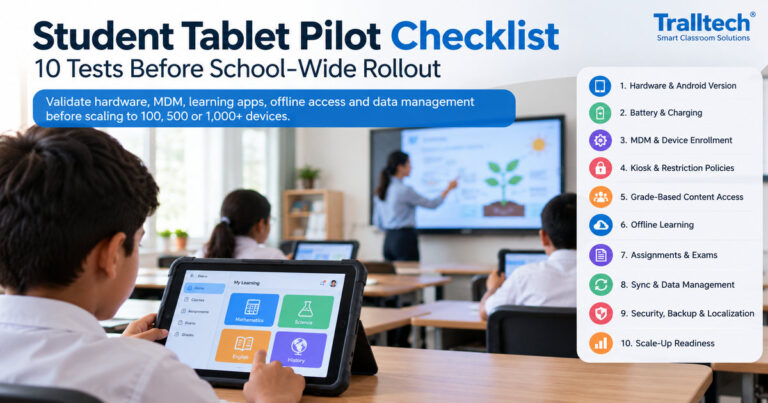
Student Tablet Pilot Checklist: 10 Tests Before School-Wide Rollout
A 10-test pilot acceptance framework for managed student tablets, covering configurable Android, MDM, learning apps, offline exams and scale-up checks.
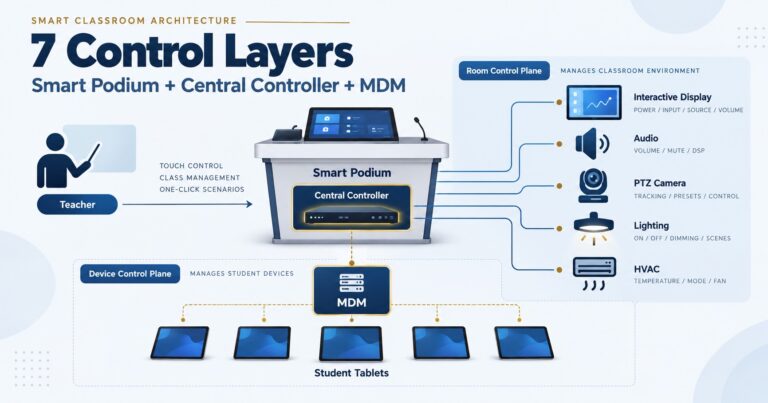
Smart Classroom Control System Architecture: 7 Layers for Integrators
A practical 7-layer smart classroom control architecture covering smart podiums, central control, AV, lighting, HVAC, MDM and student devices.
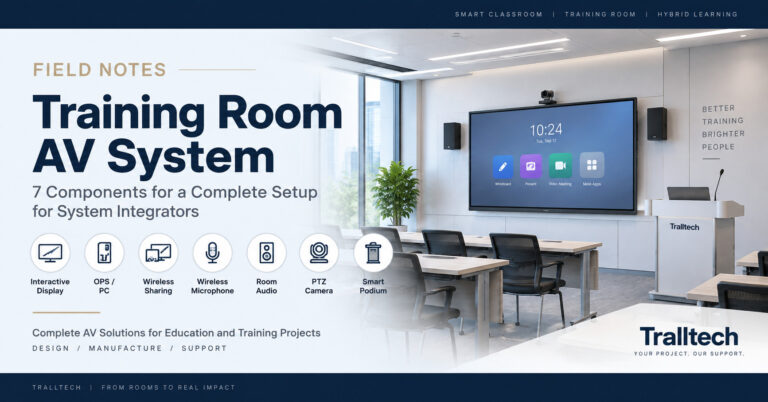
Training Room AV System: 7 Components for a Complete Setup
A practical training room AV system guide for integrators: 7 core components, three deployment levels, signal flow, audio routing and pre-quote checks.

School Computer Lab Equipment List: What a 30-Seat ICT Lab Really Needs
A 30-seat computer lab is thirteen line items, only one of which is computers. The full equipment list, the electrical maths, and the six lines most ICT tenders leave out.

Inclusive Classroom Tender Specifications: 7 Gaps in a Real 50-Classroom Bid
An inclusive classroom specification fails in the audio chain, not the display. We decode a real 50-classroom bid schedule line by line, and give the wording that fixes each gap.

Lecture Hall Sound System and AV Setup: Covering 200+ Seats Without Feedback
A lecture hall needs distributed audio, not a louder classroom system. Speaker layout, amplifier power, mic channels and display sizing for 50 to 400 seats.

Conference Room Audio System Design Guide for System Integrators
Conference room audio is a signal chain, not a product. Four ordered decisions — pickup, processing, reproduction, cabling — with a design table by room size from huddle to divisible hall.

How to Write Video Conference Room Tender Specifications
A conference room tender is a system spec, not a screen spec. The 10 blocks to define — from microphone coverage and DSP to HDBaseT, control and UPS — and how to write them brand-neutral.

How to Read a Digital Podium Specification: A Real Tender, Line by Line
A digital podium spec is a system spec: displays, PC, control ports, mic, amplifier and doc camera in one lectern. We decode a real tender line by line.

5 Smart Classroom Specification Mistakes We Found in Real Tenders
We read many real public AV tenders from different funders. The same five specification mistakes appeared in many of them. What integrators should check first.

Offline Education Solutions for the DRC and Francophone Africa: A Deployment Guide
How offline-first digital classrooms work in the DRC and Francophone Africa: local content servers, tablets, French-language resources — a deployment guide for project companies and NGOs.

Smart Classroom Audio System Design Guide for System Integrators
How to design classroom and lecture hall audio: active vs passive speakers, line-level wiring, UHF mics, coverage by room type — with example tender specs.

Smart Classroom Equipment List: Level 1, 2 and 3 Configurations
A complete smart classroom equipment list by deployment level — what belongs in Level 1, 2 and 3, and the three lines integrators always forget.

How Many Touch Points Does an Interactive Flat Panel Really Need?
10, 20 or 40 touch points? What the numbers actually mean in a real classroom, why more isn’t always better, and what to write in your tender spec.
How to Write Smart Classroom Tender Specifications
Learn how to write smart classroom tender specifications that pass technical evaluation and win projects — panel, audio, power and compliance, brand-neutral.

How to Read a Virtual Lab Tender — A Guide for System Integrators | Tralltech
Donor-funded VR and virtual lab tenders are won on the BOM, manufacturer paperwork, and offline-ready infrastructure. A reading guide for system integrators.

How to Set Up an Offline Classroom for Schools
How to set up an offline classroom with no internet: the core hardware stack, software model, and field gotchas every integrator must plan for.

What Size Display for a Conference Room? A Sizing Guide for Integrators
55″ for huddle rooms, 65–75″ for standard meeting rooms, 86–98″ for boardrooms. Full size chart by room dimensions and seating capacity inside.

Interactive Flat Panel Lead Time: How Delivery Speed Wins Tenders
How interactive flat panel lead time decides education and NGO tenders, and how system integrators can commit a delivery date they can actually meet.

Do Interactive Flat Panels Need Google EDLA Certification?
Does an interactive flat panel need Google EDLA certification? What EDLA means, when it matters, why certified panels cost more, and how to give clients Google access without it.

How to Set Up a Video Conference Room: Level 1, 2 & 3
A video conference room setup guide for system integrators: how to spec Level 1, 2, and 3 rooms, get the audio right, and stay platform-agnostic for Zoom and Teams.
Smart Classroom vs Traditional Classroom: ROI for Schools
Smart classroom ROI vs a cheap projector quote: how system integrators reframe total cost of ownership, payback, and management gains to win school and government bids.

OEM vs White-Label Interactive Displays: A Guide for Integrators
OEM, ODM or white-label interactive displays? A clear comparison for system integrators building their own branded display line, with what to ask a manufacturer.
How to Choose the Right Interactive Flat Panel Size for a Classroom
A practical guide for system integrators on choosing interactive flat panel size by viewing distance, with a room-by-room sizing table from 65″ to 110″.
What Is an Interactive Flat Panel? A Guide for System Integrators
An interactive flat panel (IFP) combines a 4K touchscreen, built-in OS and OPS slot. A practical guide for system integrators specifying classroom and meeting room displays.