
Quick answer: A digital podium specification in a modern education tender is no longer a furniture spec — it is a system spec. A typical tender now bundles dual displays, a built-in PC, a wireless microphone receiver, a power amplifier, a 4K document camera, central-control ports and a motorised stand into one line item. To read one correctly, evaluate it subsystem by subsystem: display, computing, control, audio, visualiser, and mechanics. This guide walks through a real specification an integrator sent us, line by line.
Last month, a system integrator preparing an education bid sent us a digital podium specification from a live tender and asked a simple question: “Can you supply this?”
The document was two pages long. It asked for a podium with dual displays, a motorised mobile stand, a wireless microphone system, and an integrated 4K document camera — plus more than a dozen input and output ports, an amplifier, remote management and an IC card reader.
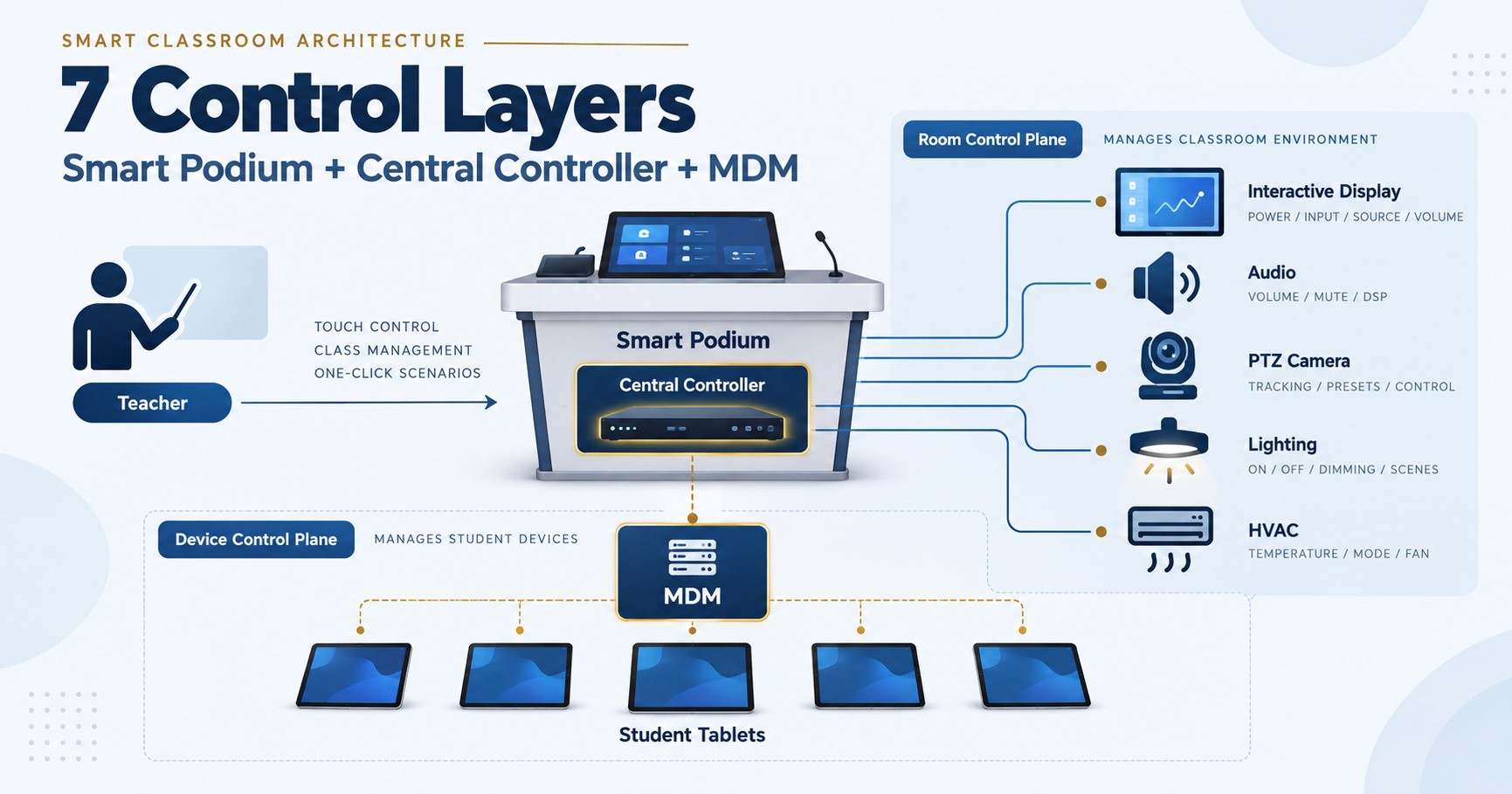
Reading it, one thing was obvious: this is not a podium. It is a classroom system wearing a podium’s body. Six different subsystems — display, computing, control, audio, visualiser, and motorised mechanics — specified as a single product. And that is exactly why these specifications intimidate integrators who are quoting one for the first time: you are not comparing lecterns, you are evaluating an integrated AV system.
So instead of just answering the enquiry, we broke the specification down line by line. Here is how to read a digital podium specification like an engineer — using this real tender (details anonymised) as the worked example.
The six subsystems hidden inside one specification
Before going line by line, it helps to see the structure. Almost every parameter in a digital podium tender belongs to one of six subsystems:
| Subsystem | Typical tender parameters | What it replaces in a traditional room |
|---|---|---|
| Display | Main touch screen, secondary control panel | Teacher monitor + control keypad |
| Computing | CPU benchmark, RAM, SSD, operating system | The teacher’s PC or laptop |
| Control | RS232 / RS485 / IR ports, signal switching, remote management | A standalone central control processor |
| Audio | Wireless mic receiver, handheld mic, built-in amplifier | Mic receiver + separate power amplifier |
| Visualiser | Integrated document camera, optical zoom, A3/A4 support | A standalone document camera |
| Mechanics | Motorised lift, load capacity, steel construction, mobility | The lectern itself |
Once you sort the parameters into these six buckets, a two-page specification stops being intimidating. You are simply checking six familiar boxes. Now let’s look at the lines that actually decide whether a bid succeeds.
Reading the specification line by line
“Minimum 10,000 PassMark CPU score” — a functional spec, written well
This is the single best-written line in the document. Instead of naming a processor model — which goes out of date, or worse, locks the tender to one brand — the buyer specified a performance floor using a public benchmark. Any modern mid-range desktop-class processor clears 10,000 PassMark comfortably; an entry-level education processor does not. That is the point: the line filters out underpowered builds without naming or excluding any vendor.
“Dual displays: 23-inch touch + 8-inch control panel” — the podium as control hub
The main touchscreen is where the teacher works. The smaller 8-inch panel is more interesting: a dedicated control surface — source switching, volume, lighting, camera — that stays available while the main screen is mid-lesson. When a tender specifies a second control display, the buyer is telling you they expect the podium to run the room, not just present in it.
“RS232, RS485, IR input and output” — a central controller in disguise
These three port types are the giveaway line for anyone who has done room integration. RS232 and RS485 are the serial protocols used to command projectors, displays, screens and lighting; IR output lets the podium relay remote-control signals to devices without a serial port. Together with “instant signal switching without image interruption,” this section describes a central control processor built into the lectern. In a traditional room, that is a separate box with its own budget line. Here it has been absorbed into the podium — which is precisely why the price of a compliant digital podium surprises buyers who mentally filed it under “furniture.”
“Built-in amplifier, minimum 2 × 40 W” — the audio chain, resolved internally
This line deserves attention because it inverts a rule integrators know from panel-based rooms. An interactive flat panel outputs line-level audio and must feed an active speaker or external amplifier — connecting passive speakers directly is the classic wiring mistake. A digital podium with a built-in 2 × 40 W amplifier is the opposite case: it can drive passive wall speakers directly, no external amplifier required. The wireless microphone receiver (dual UHF antennas, per this spec) feeds the same internal chain, so voice lift works out of one enclosure.
“Integrated 4K document camera, 10× optical zoom, A3/A4” — the visualiser moves inside
A standalone document camera is one more device to wire, power and secure. This tender folds it into the podium body, with 4K resolution and genuine optical (not just digital) zoom, plus “simultaneous dual-image display” — showing the camera feed and the teaching content side by side through software. The optical-zoom minimum is the quality gate here: digital zoom numbers are cheap to print and mean little.
“Dual electric lifting motors, 100 kg load, motorised mobile stand” — mechanics are specifications too
Dual motors, a 100 kg load rating and a minimum footprint tell you the buyer has been burned before — likely by a single-motor lift that jammed under the weight of a fully loaded podium. When steel gauge, motor count and load capacity appear in a tender, treat them as compliance items, not decoration: they are easy for an evaluator to verify and easy for a cheap build to fail.
“Centralized device management · remote management · IC card reader” — the software layer
The final block quietly moves the specification from hardware into software: the podium must join a device-management platform, accept remote administration, and authenticate teachers by IC card. For a multi-classroom project this is where long-term cost lives — a podium that cannot be managed remotely means a technician walking building to building. If you are bidding a campus rather than a single room, weight this section heavily.
Standard model or custom build? How we actually respond to a spec like this
Here is the honest answer to the integrator’s original question — and it applies to most digital podium tenders we see.
Our standard T-PDM smart podium series — 21.5-inch standard and folding, dual-screen, and 27-inch angle-adjustable models — covers the core of this specification out of the box: touchscreen operation, built-in Windows and Android computing, dual microphones, electric lift, and HDMI/network connectivity. For many tenders, a standard model plus the right accessories is the compliant, fastest-lead-time answer.
But a specification like this one goes beyond any catalogue model — the integrated 4K document camera, the specific port matrix, the motorised mobile stand. That is where the second half of our answer matters: we build custom configurations against tender specifications, and we integrate the podium into the rest of the room. Because a podium is never deployed alone. It connects to the classroom display, the speakers, the camera and the management platform — and the tender will be evaluated on whether the system works, not whether one box matches one table. The podium is one component of the complete smart classroom system we design for integrators, and we spec it together with everything it has to talk to.
Practically, when an integrator sends us a podium specification, they get back three things: a compliance table (each tender line against the proposed build, standard or custom), the integration notes (what the podium connects to and how), and the documentation ready to submit under their own name. We never contact the end client.
Digital podium specification checklist
Use this before you price any digital podium tender — it is the condensed version of everything above:
- Sort every line into the six subsystems (display / computing / control / audio / visualiser / mechanics) so nothing hides.
- Verify the CPU benchmark against the public PassMark table and document it in the bid.
- Map the port matrix — every RS232/RS485/IR/HDMI/USB line must exist on the quoted build, in the stated quantity.
- Resolve the audio chain — built-in amplifier → passive speakers, or line-level output → active speakers. Never mix the two paths up.
- Check optical vs digital zoom on the document camera; only optical is a quality gate.
- Treat mechanical lines as compliance items — motor count, load rating, steel construction are verifiable and enforceable.
- Weight the management layer for multi-room projects — remote management is where five-year cost lives.
- Ask which lines are “minimum” vs “preferred” — functional minimums leave room for equivalent builds; exact model numbers may signal a locked spec worth challenging.
Frequently asked questions
What is a digital podium?
A digital podium (also called a smart podium or smart lectern) is an all-in-one teaching station that combines a touchscreen display, a built-in computer, microphones and amplification, source switching and room-control ports in a single lectern. In modern education tenders it often also integrates a document camera and device-management software, effectively replacing four to six separate devices at the front of the classroom.
What should a digital podium specification include?
A complete specification covers six subsystems: the displays (main touchscreen and any secondary control panel), computing (CPU performance, RAM, storage), control interfaces (RS232/RS485/IR, signal switching), audio (microphone system and amplification), the document camera if integrated, and mechanics (lift, load capacity, construction). Well-written tenders state functional minimums — such as a benchmark score — rather than naming specific models.
Why do digital podium tenders specify a PassMark CPU score?
A benchmark floor guarantees real-world performance without locking the tender to one processor brand or model. It keeps the tender vendor-neutral and future-proof: any processor that clears the stated score qualifies, and underpowered builds are excluded automatically. Bidders should document their quoted processor’s score as compliance evidence.
Can a standard smart podium meet a custom tender specification?
Often partially. Standard models typically cover the display, computing, microphone and lift requirements, while tender-specific items — an integrated document camera, a particular port matrix, or a motorised mobile stand — may require a customised build. The practical approach is a line-by-line compliance table showing which requirements the standard model meets and which are addressed through customisation.
Is a digital podium part of a smart classroom solution?
Yes. The podium is the teacher’s control point, but it always operates alongside the classroom display, speakers, camera and management platform. Tenders are evaluated on whether the whole room works together, so the podium should be specified and quoted as part of the complete classroom system rather than as an isolated product.
Key takeaways
- A modern digital podium specification is a system specification — six subsystems (display, computing, control, audio, visualiser, mechanics) written as one product. Read it subsystem by subsystem and it stops being intimidating.
- The lines that decide compliance are the technical ones buyers skim: the PassMark floor, the RS232/RS485/IR control matrix, optical-vs-digital zoom, and whether the audio chain is amplified internally or expects active speakers.
- Standard models answer most of a spec; custom builds answer the rest — but the bid is won at system level, so specify the podium together with the display, audio and management platform it must integrate with.
Written by the Tralltech Technical Team · Last reviewed: July 2026
Related guides: Smart classroom tender specifications · Specification mistakes we see in real tenders · Smart classroom equipment list
Explore our solution: Smart Classroom Solution · Product: T-PDM Smart Podium